
When families find the right experience, they want to book it immediately. If infants can attend your experience but aren’t visibly priced at checkout, that booking can stall.
Even when infants can come for free, missing pricing creates uncertainty—and uncertainty can lead to lost sales.
Here’s what’s happening and how to fix it.
Why Infant Pricing Visibility Matters
Some listings allow Infants to attend but don’t display a price for that traveler type.
When that happens:
- Infants may not appear as a selectable option.
- Families may hesitate at checkout.
- Travelers may abandon the booking to look for clearer information.
Clear pricing removes friction and makes your experience fully bookable for families.
Our best-performing family-ready products have one thing in common: Every eligible traveler type is clearly defined and priced.
If Infants Are Free, Do I Still Need to Add Pricing?
Yes.
If infants can attend, they must have pricing assigned—even if that pricing is $0.
Adding infant pricing ensures:
- Families can confidently select infants.
- Your checkout experience stays seamless.
- You don’t miss out on eligible bookings.
How to Update Infant Pricing in the Supplier Center
You can make this change manually in just a few steps.
Step 1
Log in to the Supplier Management Center.
Step 2
Define all age groups that can attend.
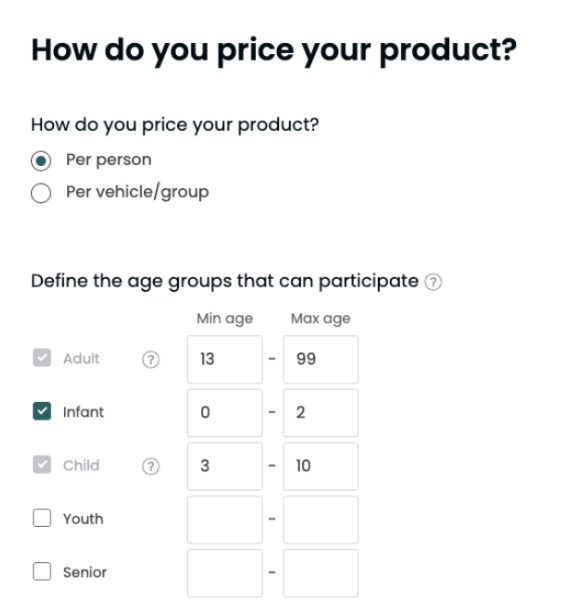
Step 3 – ⚠️ Critical Fix
Add pricing for all age groups, including any that are missing. Enter $0 if infants are free, or enter your standard rate for infants.
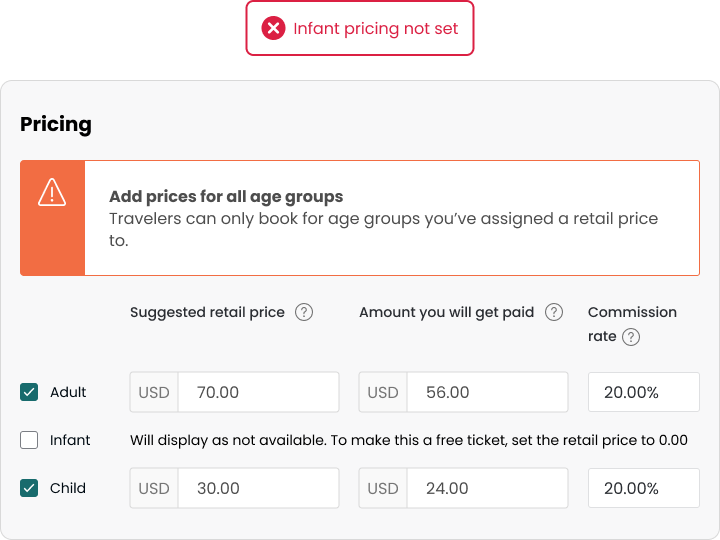
Step 4
Save and publish your changes. Once saved, infants will appear as a selectable option at checkout.
Connected Suppliers: What to Check
If your products are connected via a reservation system, infant pricing must match on both sides.
To avoid errors:
- Ensure infant traveler type exists in your booking software.
- Confirm pricing is set to $0 (if free), or your applicable rate.
- Verify your sync is returning infant pricing correctly.
If the infant traveler type exists on your Viator product but no pricing is returned through your booking system, this may trigger pricing errors.
If you’re unsure whether your system supports $0 pricing, please contact your reservation software provider.
What If Infants Don’t Take a Seat?
Some operators allow lap infants and prefer not to count them toward capacity. That’s completely fine.
Setting infant pricing to $0 does not require you to change your capacity logic. It simply ensures families can accurately select all eligible travelers during booking.
Your operational policies remain in your control.
A Small Update With Big Impact
Clear traveler definitions build trust. Trust drives bookings.
If infants are allowed to attend your experience, take a moment to confirm they’re fully visible and selectable at checkout.
A simple pricing update today can help prevent missed bookings tomorrow.
Helpful Resources: